





Introduction
Microsoft 365 is used daily by more than 345 million people worldwide to communicate, collaborate, and secure their businesses. This is the reason it's your competitive advantage and not just a productivity package.It is absolutely inadequate to rely solely on spreadsheets and email as technology transforms our lives and workplaces.
Companies require powerful, adaptable solutions that let teams to work together without interruption, maintain security, and adapt to changing circumstances. [Microsoft 365] is a powerful suite of cloud-based apps that is revolutionizing the way businesses of all kinds operate, interact, and expand. Understanding what Microsoft 365 has to offer is the first step to achieving a genuinely modern workplace, regardless of how big your company is. A startup with five employees or an organization expanding internationally.
What Is Microsoft 365?
At its core, Microsoft 365 is a cloud-first, collaboration-focused ecosystem that combines familiar Office apps, like Word, Excel, PowerPoint, and Outlook, with powerful tools such as Microsoft Teams, SharePoint, OneDrive, and more.
Unlike the traditional Office 365, Microsoft 365 puts a bigger emphasis on enterprise-grade security, device management, and intelligent cloud services designed to support the modern, mobile workforce.
Think of it as more than just “Office in the cloud.” It’s an integrated platform where productivity, communication, storage, and security come together under one roof.
Core Features for Businesses
Microsoft 365 packs a wealth of features built specifically for business needs. Here’s what makes it stand out:
Key Features of Microsoft 365
Office Apps
Create, edit, and share documents effortlessly with classic apps like Word, Excel, PowerPoint, and Outlook—all accessible across desktop, web, and mobile devices. Microsoft 365 ensures your files stay synchronized, allowing you to pick up your work right where you left off, no matter which device you’re using. Enjoy modern AI-powered features such as design suggestions in PowerPoint, predictive text in Word, and data insights in Excel, helping you work smarter and faster.
Microsoft Teams
Microsoft Teams is the modern hub for teamwork, bringing together chat, video meetings, voice calls, file collaboration, and integrated apps in one platform. Host secure video conferences with up to thousands of participants, share your screen during presentations, co-edit documents in real time, and integrate hundreds of apps directly into your workspace. Teams helps businesses foster engagement and keep conversations organized in channels dedicated to specific projects or topics.
OneDrive for Business
OneDrive for Business provides secure, cloud-based file storage and sharing, enabling you to access your files from anywhere. Share documents with colleagues or external partners while controlling permissions for viewing or editing. Automatic backup and synchronization ensure that you’re always working with the latest version of your files. OneDrive also supports advanced security measures like file encryption and ransomware detection.
SharePoint
SharePoint allows businesses to build modern intranet portals, document libraries, and team sites to streamline internal communication and content management. Share and manage content, knowledge, and applications to empower teamwork and keep everyone informed. SharePoint’s powerful search functionality and customizable workflows enhance productivity and make it easy to organize large volumes of information.
Exchange Online
Exchange Online offers business-class email services hosted in the cloud, delivering high reliability, advanced security, and seamless integration with Outlook. Manage calendars, schedule meetings, and access your email on any device while benefiting from built-in protection against malware, spam, and phishing attacks. Exchange Online helps organizations stay compliant with regulations through features like data loss prevention and eDiscovery.
Power Platform
The Power Platform includes:
* Power Apps - Easily build custom business applications without extensive coding knowledge.
* Power Automate - Automate repetitive tasks and connect multiple apps and services to create efficient workflows.
* Power BI - Turn raw data into interactive visual reports and dashboards to gain actionable insights for informed decision-making.
* Power Virtual Agents - Create AI-driven chatbots to handle customer service or internal support requests without writing complex code.
Together, the Power Platform empowers businesses to innovate quickly and solve complex challenges with low-code solutions.
Planner
Microsoft Planner is a simple yet powerful tool for task and project management. Create plans, assign tasks, set due dates, and visualize progress through charts and boards. It’s seamlessly integrated with Teams, so your team can stay organized without leaving their collaboration space.
Microsoft Loop
Microsoft Loop introduces flexible, collaborative canvases where teams can co-create, share, and update content in real time. Loop components like lists, tables, and notes stay synchronized wherever they’re embedded, whether in Teams, Outlook, or other apps, allowing true fluid collaboration across tools.
Microsoft Forms
Forms lets you quickly create surveys, quizzes, and polls to collect data and feedback from employees, customers, or external audiences. Results are automatically visualized for easy analysis and can be exported to Excel for deeper insights.
Microsoft Bookings
Bookings simplifies scheduling appointments with customers or clients, offering a customizable booking page, email confirmations, and calendar integration to reduce back-and-forth emails and improve customer service.
Microsoft Viva
Microsoft Viva is the employee experience platform that integrates with Teams to deliver insights, learning resources, well-being tools, and company communications, all designed to enhance employee engagement and productivity in hybrid work environments.
Security and Compliance
Beyond productivity apps, Microsoft 365 is built with enterprise-grade security and compliance tools:
Advanced Threat Protection (ATP) - Defends against phishing, ransomware, and malicious links or attachments.
* Data Loss Prevention (DLP) - Prevents sensitive information from being shared unintentionally.
* Multi-Factor Authentication (MFA) - Adds an extra layer of protection beyond passwords.
Compliance Center - Helps manage regulatory requirements and conduct audits with ease.*
Business Benefits of Microsoft 365
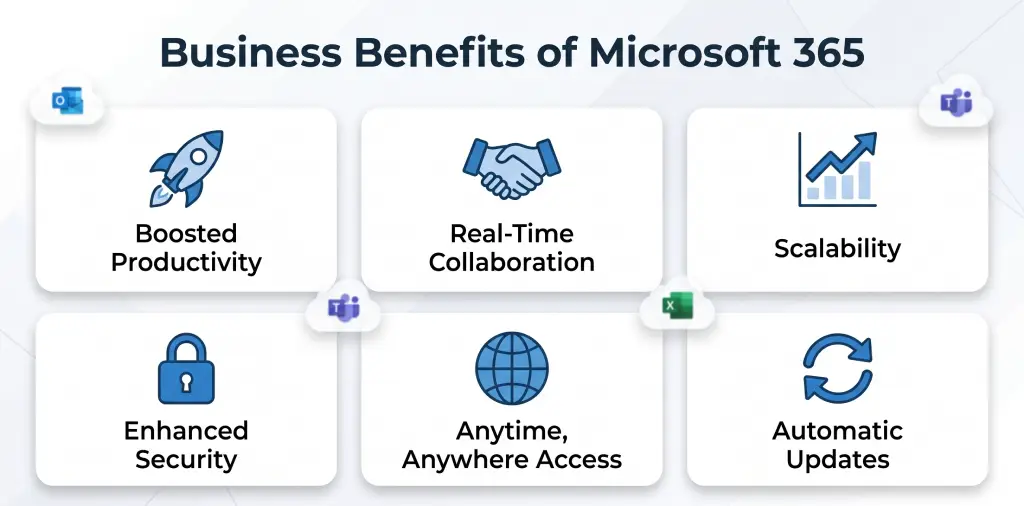
So, what does all this mean for your business? Let’s break down the real-world benefits:
Boosted Productivity - Work smarter with apps and tools that connect and sync effortlessly.
Real-Time Collaboration - Co-author documents, chat instantly, and hold meetings, all without switching apps.
Scalability - Microsoft 365 grows with you, whether you’re five users or 500.
Enhanced Security - Keep data safe with built-in, enterprise-level security features.
Anytime, Anywhere Access - Work securely from any device, wherever you are.
Automatic Updates - Enjoy the latest features without burdening your IT team with manual updates.
Security and Compliance Built for Business
In today’s threat landscape, security is non-negotiable, and Microsoft 365 delivers. Here’s how it helps keep your business safe:
Data Protection - End-to-end encryption and advanced rights management keep your files secure.
Multi-Factor Authentication (MFA) - Adds extra layers of protection to user logins.
Threat Detection - Tools help detect and block ransomware, phishing, and other cyber threats.
Regulatory Compliance - Supports standards like GDPR, ISO 27001, HIPAA, and more, helping you stay compliant across industries.
For businesses navigating security and compliance requirements Microsoft 365 offers peace of mind and robust tools to stay protected.
Microsoft 365 Plans for Businesses
Microsoft offers flexible plans so you can choose what fits your organization best:
Business Basic - Web and mobile versions of Office apps, Teams, and cloud services.
Business Standard -Includes desktop versions of Office apps plus email hosting.
Business Premium - Adds advanced security features and device management tools.
Apps for Business - Perfect if you only need the Office apps, without cloud services.
The right plan depends on factors like team size, security needs, and whether your users prefer desktop or web-based apps. Need help choosing? Bitsware can guide you through the process to find your ideal fit.
Real-World Applications & Use Cases
Microsoft 365 empowers businesses in countless ways. Here are just a few examples:
Remote & Hybrid Work - Equip your team to work seamlessly from anywhere with Teams, OneDrive, and secure mobile access.
Department Collaboration - Create shared workspaces with Teams and SharePoint for interdepartmental projects.
Process Automation - Save time and reduce errors by automating routine tasks with Power Automate.
Improved Communication - Unify calls, video meetings, and emails through tight integration between Teams and Outlook.
Businesses across industries, from manufacturing to education, are transforming how they work thanks to Microsoft 365.
Getting Started with Microsoft 365
Thinking about migrating? Here’s how to start smoothly:
1. Plan the Transition - Review your current systems and identify how workflows will map to Microsoft 365 tools.
2. Train Your Team - Invest in user training so your employees can hit the ground running.
3. Work with a Partner- Partnering with experts like Bitsware ensures a seamless rollout, user adoption, and ongoing support.
Migration might sound difficult, but with the right approach,and the right partner,it doesn’t have to be.
Conclusion: More Than Just Office in the Cloud
Microsoft 365 is more than simply an update; it's an extensive digital office solution that combines security, collaboration, and productivity into a single, potent platform. Your team can work more efficiently, stay connected, and adjust fast, anytime, anywhere, with the help of tools like Teams, OneDrive, Office applications, and the Power Platform.
Are you ready to update your company's operations?
Trust Bitsware to help you with optimizing Microsoft 365. We will help you at every stage, from setup to support, so you can concentrate on expanding your company with assurance and clarity.
